I’ve spent the better part of a decade sleeping on overnight buses in Southeast Asia and eating $2 street tacos in Mexico City just to make my travel fund last another month. But if there’s one thing I’ve learned from years on the road, it’s that "budget travel" doesn’t always have to mean "budget quality." Sometimes, it means knowing how to manipulate the complex machinery of airline loyalty programs to get a $7,000 trip for the price of a few tanks of gas.
The United Excursionist Perk is, without a doubt, the most powerful tool in the MileagePlus arsenal. It is essentially a "buy two, get one free" deal for international award flights, but with a twist that allows you to snag an entire extra leg of a journey—like a flight from Australia to New Zealand—for zero additional miles. While most travelers are focused on finding the cheapest one-way ticket to Sydney, we’re going to look at how to trigger a free Sydney stopover that can boost your redemption value to over 9 cents per mile.
At its core, the United Excursionist Perk is a free one-way award flight available to MileagePlus members who book a multi-city itinerary. To trigger it, your trip must start and end in the same region (like North America), while your "free" leg must occur entirely within a different single geographical region (like Australia/New Zealand). If you do it right, that middle flight across the Tasman Sea or across the Australian Outback shows up as "0 Miles."
Decoding the Rules: How the Excursionist Perk Works
The Excursionist Perk isn't a glitch; it's a built-in feature of the United booking engine. However, the airline doesn’t exactly go out of its way to explain how to exploit it for maximum value. To make this work, you have to satisfy five specific rules. Think of it like a math problem: if one variable is off, the "0 Miles" price tag disappears.
- The Origin Parity: Your journey must start and end in the same MileagePlus region. If you leave from New York (North America), your final flight home must return to North America (e.g., Vancouver or Los Angeles).
- The "Excursion" Region: The free flight must take place within a single MileagePlus region that is not your origin region. You can’t get a free flight within the U.S. if your trip started in the U.S.
- The Cabin Class: The class of service for your free leg will be the same as (or lower than) the flight preceding it. If you fly Business Class to Sydney, your free leg can be in Business. If you fly Economy, your free leg is Economy.
- The Sequence: The free leg must be the second or subsequent leg of the trip, occurring after you’ve already crossed into a new region.
- Single Region Constraint: The free flight must start and end within the same region. You can fly from Sydney to Perth (both in the Australia/Oceania region), but you couldn't fly from Sydney to Tokyo for free.
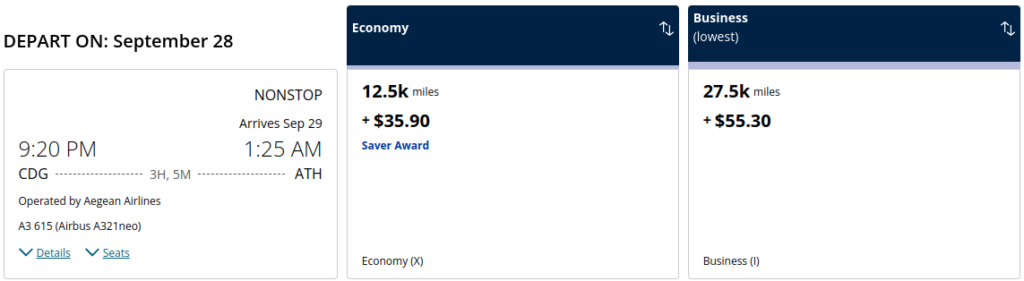
Understanding these regions is critical. United divides the world into 17 zones. Australia, New Zealand, and various Pacific islands fall into the "Australia/New Zealand/Oceania" region. This is a powerhouse for the Excursionist Perk because flights within this region—like a five-hour haul from Sydney to Perth or a flight from Sydney to Auckland—can be notoriously expensive if paid for in cash.
The Sydney Blueprint: A $7,200 Itinerary for 80,000 Miles
To see the real-world power of this "shoestring" hack, let's look at a common high-value route. Imagine you are planning a bucket-list trip to the South Pacific. Usually, you’d book a round-trip to Sydney and call it a day. But with the Perk, we’re going to turn that into a multi-country adventure.
Consider this itinerary:
- Leg 1: Phoenix (PHX) to Sydney (SYD)
- Leg 2 (The Perk): Sydney (SYD) to Christchurch (CHC) — 0 Miles
- Leg 3: Auckland (AKL) to Phoenix (PHX)
By using the Perk, the flight from Sydney to New Zealand costs you nothing in miles. In a recent search, this exact itinerary—booked during peak season—carried a cash price of $7,208. By leveraging 80,000 United miles, the traveler only had to pay $174.15 in taxes and fees. That is a staggering redemption value of over 9 cents per mile. For a backpacker, that’s the equivalent of getting a five-star experience on a hostel budget.
| Expense Category | Cash Booking | United Award Booking (Excursionist Perk) |
|---|---|---|
| PHX to Sydney | $2,540 | 40,000 Miles |
| Sydney to Christchurch | $580 | 0 Miles |
| Auckland to PHX | $4,088 | 40,000 Miles |
| Total Cost | $7,208 | 80,000 Miles + $174.15 |
The beauty of this hack is that the Excursionist Perk has no time limit. You could spend three days in Sydney or three weeks. As long as the flights are available as "Saver Awards," the middle leg remains free. This allows you to explore the Blue Mountains and the Sydney Opera House, then hop over to the South Island of New Zealand for some hiking, all without touching your mileage balance for the second flight.

Funding the Trip: Strategic Mile Accumulation
You might be thinking, "80,000 miles sounds like a lot." But in the world of credit card rewards, it’s actually incredibly accessible. If you’re traveling as a couple, you’ll need 160,000 miles for two round-trip tickets.
You can acquire these miles by combining just three strategic credit card welcome offers within a single booking cycle. For example, a United Quest℠ Card often features a 60,000 to 80,000-mile bonus. Pair that with a Chase Sapphire Preferred® Card—where points transfer 1:1 to United—and you are already at your goal.
Pro-Tip: If you have a small business or a side hustle (even selling items on eBay counts), the Chase Ink Business Preferred® Credit Card often offers a massive 100,000-point bonus. That single card alone can fund your entire Sydney adventure plus the free stopover.
Explore United Co-Branded Cards →
Step-by-Step: How to Trigger the Perk on United.com
Ready to book? You don't need to call a specialized agent or use a "secret" website. Everything happens right on United.com. The key is to avoid the standard "Round Trip" or "One Way" search boxes.
Step 1: Select Multi-City Navigate to the United home page. Ensure "Book with miles" is checked. Instead of entering your destination, click on the "Multi-city" link. This is the only way to trigger the Perk logic in the system.
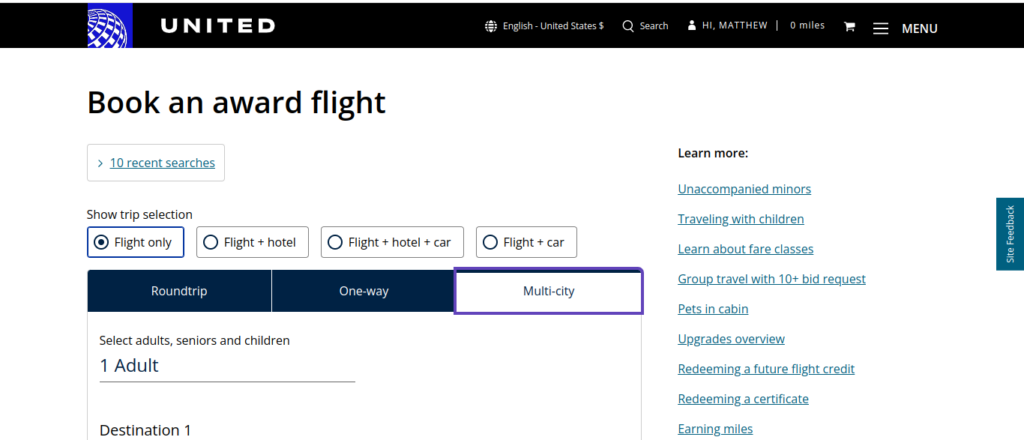
Step 2: Input Your Segments Enter your three legs:
- Leg 1: Your home airport to Sydney.
- Leg 2: Sydney to your next destination (e.g., Christchurch, Brisbane, or Melbourne).
- Leg 3: Your final destination back to your home airport.
Step 3: Look for the '0 Miles' Indicator As you select your flights, the system will calculate the mileage for each leg. If you’ve followed the rules, when you get to the search results for Leg 2, you will see various flight options listed at 0 Miles.
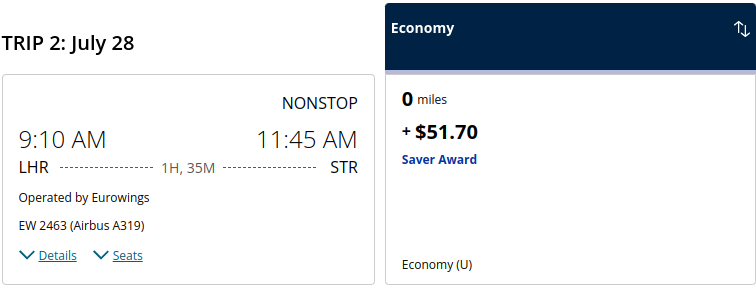
If you see a mileage cost for Leg 2, don't panic. It usually means one of two things: either there is no "Saver Award" availability for that specific flight, or you’ve accidentally violated one of the five rules (like trying to fly to a different region for the free leg).
Troubleshooting: What to Do if the Perk Doesn’t Trigger
Even for seasoned hackers, the United search engine can be finicky. Here’s how to handle common roadblocks:
- The "Saver" Requirement: The Excursionist Perk only works if there is "Saver" availability on all legs. If Leg 1 or Leg 3 is an "Everyday Award" (which costs more miles), the middle leg might not show up as free. Look for the "Saver Award" label in the search results.
- The Website Glitch: Sometimes the multi-city tool just hangs. If this happens, try using the "Advanced Search" tool on United's site, which allows you to filter specifically for United-operated flights or Star Alliance partners.
- The Agent Roulette: If you have to call United to book because of a complex itinerary, be prepared for a "Millennial's Nightmare." Many phone agents aren't fully trained on the technicalities of the Excursionist Perk. If they try to charge you miles for the middle leg, politely hang up and call back. You want an agent who knows that "0 miles" is the correct price for a qualifying middle segment.
Advanced Strategy: The 'Non-Continuous' Itinerary
If you want to move from "Budget Traveler" to "Mileage Master," you need to know that the Excursionist Perk doesn't require your flights to be continuous. This is what we call "nesting" or "shuffling."
You could fly from the U.S. to Sydney in June. Then, you could use your "Free Excursion" to fly from Sydney to Auckland. But you don't have to fly back home from Auckland immediately. You could theoretically book your return flight from Auckland back to the U.S. for December.
Furthermore, the Perk doesn't even require the free leg to connect to the first leg. You could fly U.S. to London (Leg 1), then fly Sydney to Brisbane (Leg 2 - Free), then fly London back to the U.S. (Leg 3). As long as you have a way to get yourself to Australia for that free leg (perhaps using a different airline's miles), the system will still honor the "0 Miles" price because you've met the regional requirements.
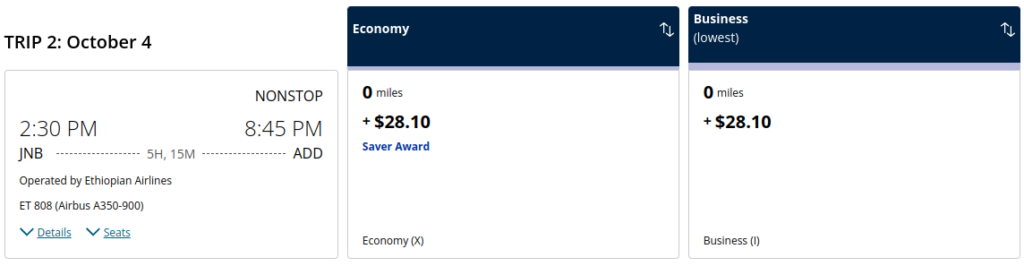
This level of flexibility is why I never book a standard round-trip ticket anymore. There is almost always a way to "nest" a free flight into an existing itinerary, whether it's a quick hop across Europe or a massive trans-continental journey across Australia.
FAQ
Q: Do I have to pay taxes on the 'free' leg? A: Yes. While the mileage cost is zero, you are still responsible for government-imposed taxes and airport fees. For a flight between Australia and New Zealand, these are usually around $30–$70.
Q: Can I use the Perk on partner airlines like Air New Zealand or Lufthansa? A: Absolutely! As long as the flight shows up on United.com as a "Saver Award," the Perk applies to any Star Alliance partner. This is vital for Sydney stopovers, as you'll likely be flying Air New Zealand for those trans-Tasman routes.
Q: Does the Excursionist Perk work for Business Class? A: Yes, but only if your first long-haul leg was also booked in Business Class. If you fly Economy to Sydney, you cannot use the Perk for a Business Class flight to New Zealand.
The United Excursionist Perk is the ultimate "insider hack" for anyone who wants to see more of the world for less. It takes a little bit of patience to master the multi-city search tool, but when you see that "$7,000 itinerary" drop to "80,000 miles and $0 for the middle flight," you’ll realize that the extra effort is worth every penny—or rather, every mile.